


Loan Calc Hub
3.615.00 Reviews
App Specs
- Version
- 1.2.0.0
- Updated On
- License
- Free
- Downloads
- 1,000,000+
- Developer
- AppDsgnur
- Categories
- Finance
- Platform
- Android
Screenshots

 Analysis by AppCompare
I spent time with Loan Calc Hub as a practical finance app rather than treating it like a full banking service. Its purpose is focused: it helps turn common borrowing and saving questions into understandable estimates. If you are comparing a loan, checking what a fixed deposit might return, or thinking about a recurring investment, the app gives you a place to work through those calculations without opening a spreadsheet.
That narrow purpose is also the key to judging it fairly. This is not an app for moving money, applying for credit, opening an account, or managing a portfolio. It is a calculator hub from AppDsgnur, and I found its usefulness depends on whether you want quick planning figures or a complete financial decision-making tool. For everyday “what would this cost?” questions, that distinction matters more than a long feature list.
What Loan Calc Hub is useful for in everyday planning
The app sits in the finance category and is free to use. That makes the first step easy: you can try its calculators without treating the download as a financial commitment. The age rating is Everyone, so its presentation is intended to be broadly accessible rather than aimed at a specialist audience. I would still expect adults to make the final decisions, because an estimate is not the same thing as a lender’s formal repayment schedule or an institution’s confirmed return.
Its three central jobs are clear. You can calculate loan repayments, estimate the result of a fixed deposit, and explore recurring investments. Those are different questions, even though they all involve rates, time and repeated payments. A loan asks how much you may need to pay; a fixed deposit asks what a one-time deposit could grow into; a recurring investment asks what repeated contributions might become. Keeping these scenarios separate is one of the app’s most useful qualities.
In my experience, the best way to use it is before you speak to a lender or commit to a savings product. I would enter a realistic amount, term and rate, note the result, then run a second version with a less optimistic assumption. That simple two-pass habit is more valuable than accepting the first number as a promise. It shows how sensitive the outcome is to the inputs and helps prevent a convenient estimate from becoming an accidental budget.
What the free access means
There is no purchase price to weigh up here: Loan Calc Hub is free. That gives it a straightforward value proposition for someone who only needs occasional calculations. You can test whether the workflow suits you without paying for access first, and the app’s basic role does not require the kind of long-term commitment associated with a financial subscription.
Free access does not make every result automatically reliable. The quality of the answer still depends on entering the right figures and understanding what the calculation represents. A result can look precise while being based on a rate that changes, a fee that was ignored, or a payment pattern that differs from the lender’s method. I would use the app to prepare questions and compare scenarios, not as the final authority on a contract.
Worth Reading Before You Choose

EA SPORTS FC Mobile 26 Is a Bigger Football Game, but It Takes Time

Flipboard Shows What News Apps Must Do Beyond the Feed

Switching to Android Auto Means Rethinking Your Driving Routine

Google Calendar Makes a Crowded Week Easier to Manage

Ludo King Makes the Most of the Minutes Between Plans

Baby Panda World Brings Quick Play to Modern Phones, but Its Game Library Feels Busy
The app has an average rating of 3.5 from around a thousand ratings, with a smaller set of written reviews behind that overall score. I read that as a reason to keep expectations measured. It has attracted over a million installs, which suggests that the basic idea is useful to a sizeable audience, but popularity does not remove the need to check each calculation against the terms of the product you are considering.
Trying the loan calculator in a real situation
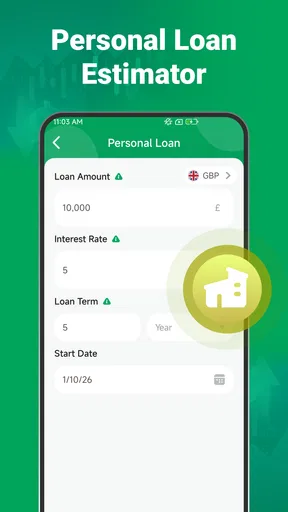
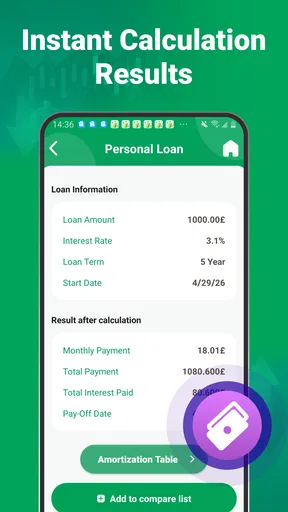
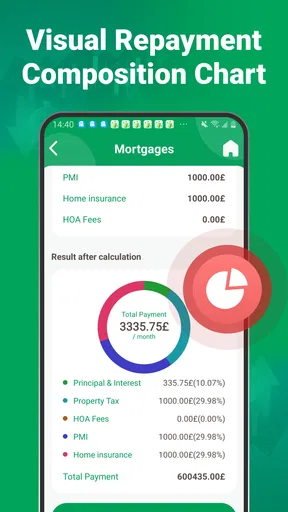
Imagine I am considering a personal loan for a necessary household expense. Before contacting a provider, I would use the loan section to estimate the regular repayment and then compare that figure with my comfortable monthly budget. The important question is not simply whether the payment fits on paper. I would also ask whether it still fits after rent, utilities, food, transport and an unexpected expense are included.
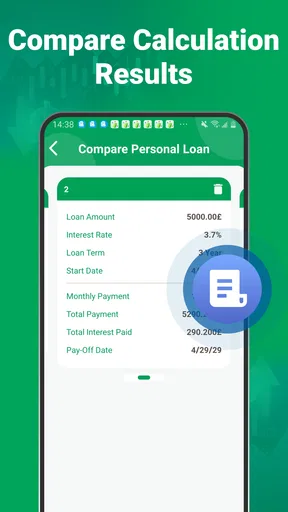
A helpful workflow is to run the same borrowing amount over a shorter and a longer term. The shorter option may produce a heavier regular payment, while the longer option may feel easier each month but keep the debt active for more time. Even without treating the output as a lender quote, that comparison gives me a clearer conversation starter. It can also reveal that reducing the amount borrowed may be more useful than stretching the term.
Another practical use is checking affordability before shopping. If I calculate a comfortable repayment first, I am less likely to let a salesperson’s focus on the monthly figure hide the broader cost. I can test a lower purchase price or a larger upfront contribution and see how the borrowing need changes. This is a better use of a calculator than entering a desired purchase and using the result to justify it.
The limitation is that a simple repayment estimate may not capture every part of a real agreement. Fees, insurance, taxes, changing rates, irregular payment schedules and lender-specific rounding can affect the final amount. I would therefore compare Loan Calc Hub’s result with the official illustration supplied by the lender. If those numbers differ, the official document deserves priority, and the difference itself is worth asking about.
Using fixed-deposit estimates without overreading them
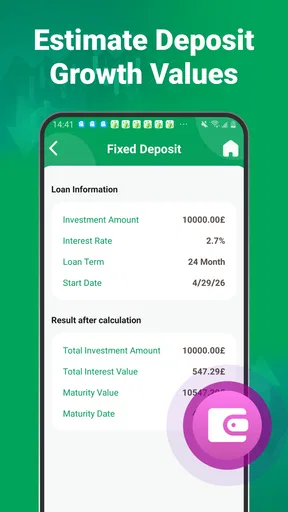
The fixed-deposit calculator is aimed at a different kind of decision. Here, I would use it to estimate what a single deposit might become over an agreed period at a stated rate. That is useful when comparing a few possible terms or when deciding whether locking money away is worthwhile for a particular goal.
My preferred approach would be to calculate the expected maturity amount, then subtract the original deposit mentally to focus on the growth rather than the headline total. I would also record the term and rate beside the result. Without that context, a larger final number can look attractive even when it requires leaving money unavailable for longer than I can comfortably manage.
This is where the app can help with a less obvious trade-off: liquidity. A fixed deposit may suit money that I know I will not need during the chosen period, but it is a poor fit for an emergency reserve or a bill that could arrive unexpectedly. I would use the calculator after setting aside accessible cash, not before. The estimate can show the reward for locking funds away, but it cannot decide whether the loss of flexibility is acceptable.
I would also verify how the institution handles interest, early withdrawal and taxes. The calculator is useful for a clean comparison, yet the actual product rules may change the amount I receive or the date I can access it. That makes the fixed-deposit tool strongest as a screening device: it helps me identify which offers deserve closer reading, rather than replacing that reading.
Exploring recurring investments with realistic habits
The recurring-investment section is potentially the most useful for people who think in monthly habits rather than one-time deposits. I can use it to see how regular contributions may build over time, which is a more practical question than asking whether I can find a large lump sum today.
The most valuable test is not the most ambitious one. I would enter an amount that I could continue during an ordinary month, not just during a month with no repairs, travel or family costs. Then I would compare it with a smaller contribution. Seeing both outcomes can make the trade-off concrete: a modest amount that continues consistently may be more realistic than a larger amount that forces repeated pauses.
There is an important distinction between an estimate and a guaranteed result. Recurring investments can involve returns that vary, and the calculator’s output should not be treated as a promise. I would use it to understand the effect of contribution size and time, then investigate the actual investment product separately. If I need guaranteed maturity terms, the fixed-deposit calculation is a different conversation entirely.
A useful advanced habit is to test what happens when contributions stop temporarily. I would calculate the normal plan, then calculate a lower contribution or a shorter saving period. That does not predict my future precisely, but it helps me build a plan with room for real life. The app becomes more useful when I use it to examine resilience rather than only the best-case result.
Where the app saves time
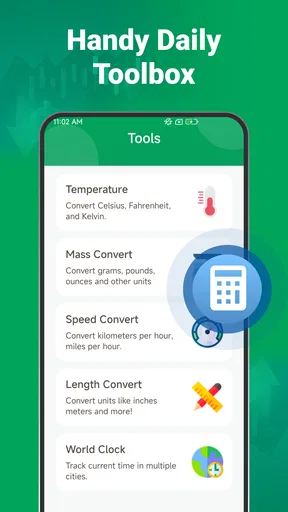
Compared with doing the same work manually, a dedicated calculator hub is convenient because the three scenarios are grouped around familiar financial tasks. I do not need to build separate spreadsheet formulas for a quick first estimate, and I can move from borrowing to saving without changing tools. For a person who wants a fast answer while comparing options, that simplicity is the main value.
Compared with a bank’s calculator, the app may be more neutral for early research because I am not starting inside one provider’s product journey. That is useful when I am still deciding what type of financial product fits my situation. A bank’s own tool becomes more important later, because it should reflect that institution’s actual rates, fees and repayment rules.
Compared with a full personal-finance app, Loan Calc Hub is more focused but less comprehensive. It is not the place I would go to categorize spending, track balances, monitor investments or manage accounts. That is not a flaw in its intended role, but it does mean I would probably keep another tool for ongoing money management. The app works best as a specialist calculator beside, not instead of, a broader financial system.
Small details that improve the quality of a result
First, I would avoid entering rounded figures simply because they are easier. If a lender or product uses a particular amount, term or rate, I would use those exact inputs in the calculator and keep a note of them. A rounded estimate can be fine for a quick conversation, but it becomes less useful when I am comparing two close alternatives.
Second, I would run a sensitivity check. For a loan, I might test a slightly higher rate or a shorter term. For a fixed deposit, I might compare different lock-in periods. For a recurring investment, I might reduce the contribution to reflect a difficult month. This turns one output into a small decision map and exposes which assumption matters most.
Third, I would separate the result from the decision. I might write down the calculated payment, the total expected amount and the assumptions used, but I would not treat the number as approval, advice or a guarantee. That separation is especially important when the app is used by someone who is new to borrowing or investing.
Fourth, I would check whether the financial product uses the same payment frequency and interest convention represented by my inputs. A monthly estimate may not match a product that compounds or charges differently. When the result matters, I would ask the provider to explain the calculation rather than trying to force the provider’s figure to match the app.
Trade-offs I noticed during use
The focused design is both the strength and the boundary. I like that the app does not try to become a wallet, broker or banking portal. That keeps the purpose understandable. At the same time, anyone expecting account connections, transaction tracking, reminders or detailed product comparisons will need something else.
Another trade-off is speed versus context. A calculator can produce an answer quickly, but it may not explain every financial assumption behind that answer. I found the app most helpful when I already knew what I was trying to compare. If I were unfamiliar with interest rates, compounding or repayment terminology, I would want to read supporting guidance from a trusted financial source as well.
The rating of 3.5 suggests a mixed user experience rather than universal satisfaction. I would not dismiss the app because of that, especially since a calculator can be worthwhile even when it is not a complete finance solution. However, I would test the interface carefully with a small, familiar example before relying on it for a major decision. If entering or revising values feels unclear, that friction matters more than the app’s broad purpose.
The current version is 1.1.0.0 and it works on operating system version 9 or later. That makes compatibility worth checking before installing on an older device. I would also keep the app updated through the normal store process, particularly for a finance tool where calculation behavior and usability are more important than visual novelty.
Who will get the most value
I would recommend it to a first-time borrower who wants to understand the shape of a repayment before speaking with a lender. It is also a sensible companion for someone comparing fixed-deposit periods, or for a saver trying to choose a recurring contribution that fits an actual monthly budget. Students, households and small-business owners doing early planning may appreciate having these calculations in one focused app.
It is especially suitable for people who want to explore several “what if” versions quickly. The free price removes a barrier to experimentation, and the three calculation areas cover common decisions without requiring a full financial-management setup. If I were helping a friend prepare for a meeting with a bank, this is the kind of tool I would suggest for creating a short list of sensible questions beforehand.
I would skip it if I needed a complete record of my finances, live product rates, account management or regulated personal advice. I would also choose a provider’s official calculator when I am already evaluating a specific loan or deposit and the exact contract terms matter. For investment decisions involving risk, tax treatment or a detailed portfolio, a dedicated investment platform and qualified guidance would be more appropriate.
My buy-or-skip verdict
There is no purchase decision to make because Loan Calc Hub is free, so my verdict comes down to whether its focused tools match your needs. For quick estimates across loans, fixed deposits and recurring investments, I think it is worth trying. The strongest use is not accepting a single number; it is comparing realistic scenarios and carrying the assumptions into a more informed conversation with a bank or financial provider.
I would keep it on my phone for early-stage planning, while treating every result as an estimate that needs context. Its million-plus installs show that the concept has broad reach, but the middling average rating tells me to judge the actual workflow on my device rather than assuming it will suit everyone. The developer, AppDsgnur, has kept the idea compact, and that compactness is valuable when I need a calculation rather than a full money-management system.
My recommendation is simple: use it when you want a free, focused way to compare borrowing and saving scenarios, and skip it when you need official quotes, account features or deeper financial guidance. If you approach the outputs as planning aids, build in conservative assumptions and verify important figures against the relevant provider, Loan Calc Hub can earn a useful place in an everyday financial toolkit.
Pros
- Simple loan calculations with clear repayment estimates.
- Supports comparing different loan amounts and terms.
- Useful for planning budgets before applying for credit.
- Quick results without requiring a lengthy setup.
- Clean interface suitable for occasional users.
Cons
- Results may not include every lender’s fees or eligibility rules.
- Interest estimates can differ from actual lender offers.
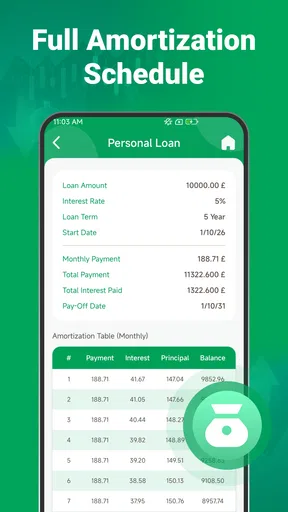
- Limited value if you need detailed amortization analysis.
- Requires accurate input to produce meaningful calculations.
- Loan information may need manual updates over time.
FAQs for Loan Calc Hub
What is Loan Calc Hub used for?
Loan Calc Hub is designed to help users estimate loan payments and understand borrowing costs before applying for credit. You can typically enter details such as the loan amount, interest rate, repayment period, and payment frequency to receive an estimated installment and total repayment figure. It is useful for comparing scenarios, although the results should be treated as planning estimates rather than official lending offers.
Can Loan Calc Hub calculate different types of loans?
The app is mainly useful for standard installment-loan calculations, including personal loans, vehicle financing, mortgages, and other borrowing arrangements with regular payments. Its usefulness depends on the calculation options available in the version you install. Loans with variable rates, irregular repayments, fees, insurance, balloon payments, or complex repayment structures may require additional calculations or confirmation from the lender.
Are the results from Loan Calc Hub accurate and legally binding?
Loan Calc Hub can provide helpful mathematical estimates, but its results are not a guarantee of the amount you will pay or the terms a lender will approve. Actual costs may include origination fees, taxes, insurance, late-payment charges, changing interest rates, or lender-specific calculation methods. Always compare the app’s estimate with the official loan agreement and ask the provider to explain any differences.
Does Loan Calc Hub require personal or financial information?
For basic calculations, a loan calculator normally only needs general figures such as the principal, interest rate, and repayment term. You should still review the app’s privacy policy and requested permissions before entering sensitive information. Avoid providing banking passwords, card numbers, government identification, or unnecessary personal details unless you have verified why the information is required and how it will be protected.
Is Loan Calc Hub suitable for choosing a loan or managing repayments?
Loan Calc Hub can be a convenient starting point for comparing monthly payments, total interest, and different repayment periods. However, it should not be used as the only basis for choosing a loan. Consider your income, existing debts, fees, penalties, affordability, and the lender’s full terms. The app may support financial planning, but it does not replace professional advice or a formal affordability assessment.


